


ASL has always tried to make powerful DFS tools as easy to use as possible. Sometimes that means putting complicated mathematics behind a simple checkbox.
Auto Max Exposure and Auto Min Exposure are good examples.
We introduced these features to make it easier to build diverse sets of multiple lineups without requiring you to manually assign exposure limits to every player. Auto Max was designed to keep the strongest players from becoming overexposed, while Auto Min helped make sure other viable players still received some exposure.
The idea was good. The default settings did not always produce the best balance.
In some cases, top players were limited too aggressively while lower-projected players were used more than we wanted. ASL has always had deeper mathematical controls behind these calculations, but we originally kept them out of the user interface because we wanted to keep Pro Options relatively simple.
We are now exposing those controls.
That makes this a good time to return to Auto Max and Auto Min, explain what the settings actually do, and—more importantly—show what happens when we change them.
First: What Is Exposure?
Your player exposure is simply how often a player appears across your lineup set.
If you generate 100 lineups and a player appears in 30 of them, your exposure to that player is 30%. With 20 lineups, one appearance represents 5%.
That is different from projected ownership, which estimates how often other DFS players may use that player.
Maximum and minimum exposure also serve different purposes.
A maximum exposure is a ceiling. If a player has a maximum of 30 appearances in 100 lineups, the optimizer is allowed to use him up to 30 times. It is not being asked to use him exactly 30 times.
A minimum exposure is a target in the other direction. A minimum of 10 asks the optimizer to try to use that player at least 10 times. Because the generator still has to satisfy salaries, roster rules and other lineup requirements, minimums are goals rather than absolute guarantees.
Why Automatic Exposure?
Optimizing one lineup and managing 100 lineups are different problems.
Without exposure controls, an optimizer may repeatedly favor the same group of highly projected players. That can produce strong projected lineups, but a very concentrated portfolio.
At the other extreme, manually assigning individual minimums and maximums to every player becomes cumbersome very quickly.
Auto Max and Auto Min give every player projection-based exposure values automatically. The challenge is finding the right balance between diversification and projected lineup quality.
That is what the new controls are designed to help you do.
A 100-Lineup Stress Test
For this article, I used an NFL Main slate and generated 100 lineups.
That is intentionally a demanding test. With 100 lineups, every appearance equals exactly 1% exposure, and the exposure rules have enough lineups to materially affect the results.
I also turned off stacking, ownership and diversity bonuses so we could isolate the exposure settings themselves.
With Auto Max and Auto Min both turned off, the optimizer produced 100 lineups using 49 different players with a total projected fantasy-point value of 14,076.66.
That gives us a useful benchmark.
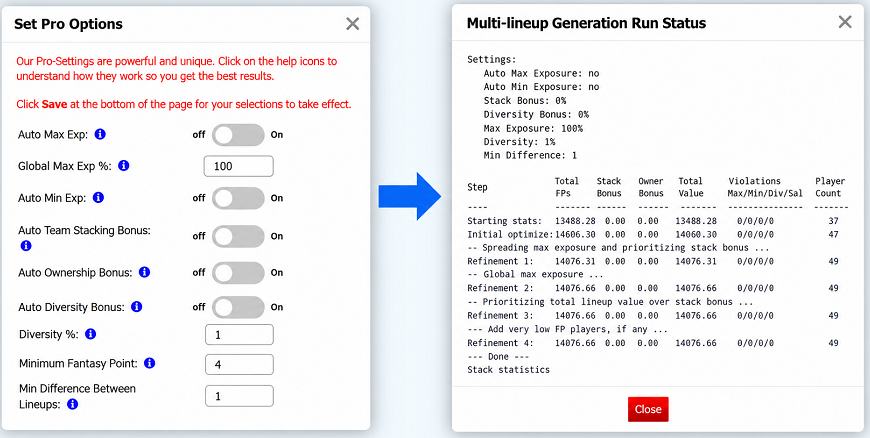
When I turned both Auto Max and Auto Min on using the original default settings, the result changed dramatically.
The optimizer used 145 players, but total projected fantasy points fell to 12,702.52—a decline of about 9.8%. It also finished with 79 unresolved Max appearances and 17 unresolved Min appearances.
We had achieved much more diversification, but at too high a price.
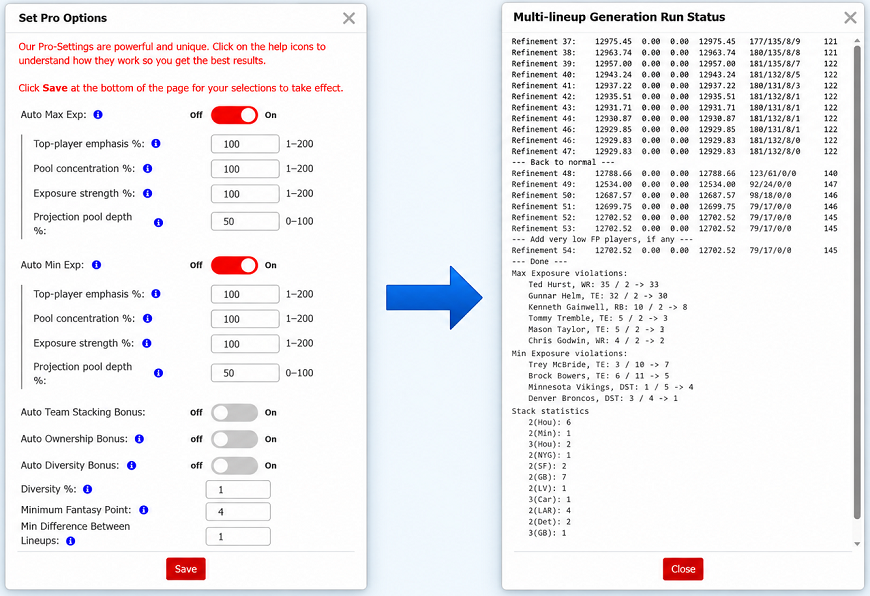
The goal is not maximum diversification. The goal is to gain useful exposure to additional players without allowing the exposure rules to overwhelm the projections.
The new controls give us four different ways to adjust that balance.
The Four Controls
Each Auto Max and Auto Min calculation now has its own four settings.
Top-player emphasis controls how strongly one part of the calculation favors the highest projections.
Pool concentration controls how steeply or evenly the broader exposure curve is distributed.
Exposure strength scales the resulting Max or Min appearance counts.
Projection pool depth determines how far below the best projection at each roster slot the main exposure calculation extends.
These are not four versions of the same “diversity” control. They change the exposure calculation in very different ways.
The best way to see that is to test them.
Auto Max Exposure
Max Test 1: Exposure Strength
The original Auto Max calculation at Strength 100 produced 13,198.39 projected fantasy points, used 106 players and still finished with 99 Max exposure violations.
I then increased Max Exposure Strength from 100 to 200, leaving the other settings unchanged.
Strength directly scales the calculated maximums. At 200, many of the strongest players reached the 100-lineup ceiling, while a fallback Max of 2 became 4.
That gave the optimizer considerably more freedom.
The result improved to 13,372.53 projected fantasy points, the number of players used fell from 106 to 82, and Max exposure violations fell from 99 to zero.
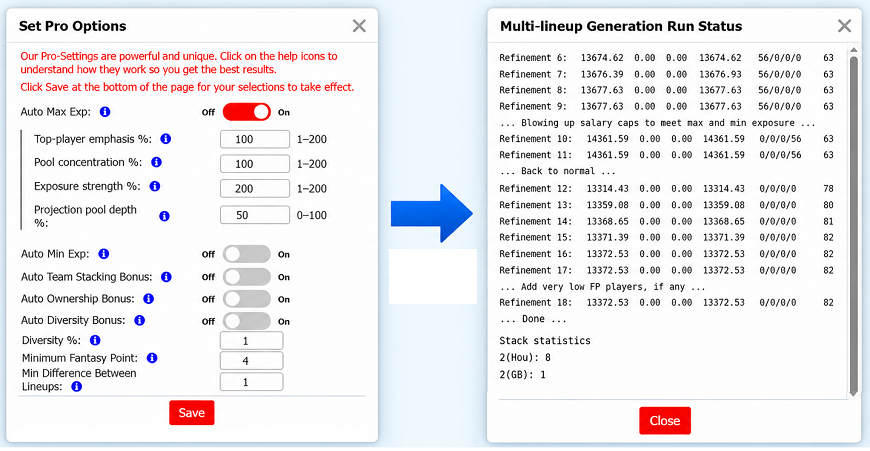
That illustrates the basic role of Max Strength:
Higher Max Strength loosens the exposure ceilings.
That does not force the optimizer to use a player more often. It simply gives the optimizer more permission to use its preferred players when doing so produces better lineups.
In this test, the original maximums were too restrictive. Loosening them allowed the optimizer to use fewer players, recover projected scoring and eliminate the exposure conflicts.
Max Test 2: Projection Pool Depth
Projection Pool Depth changes a different part of the calculation.
At the original Depth 50, players below the main projection cutoff fell back to very small maximums. That created an abrupt break between players inside and outside the primary allocation pool.
I increased Max Projection Pool Depth from 50 to 100, while leaving Strength at 100.
Now essentially the entire available projection pool participated in the primary calculation rather than leaving a large group on the fallback Max.
The result was striking.
Projected fantasy points increased from 13,198.39 to 13,710.07. The number of players used fell from 106 to 50, and all Max violations disappeared.
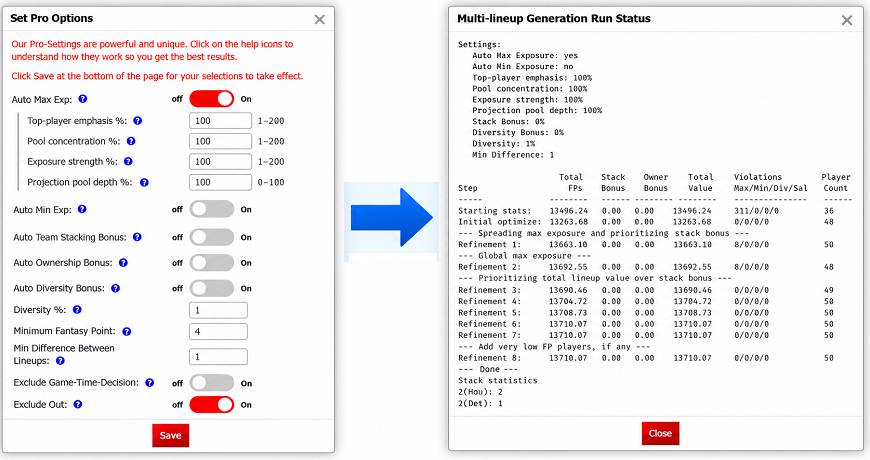
This is an important distinction:
Projection Pool Depth does not determine who is eligible for a lineup.
It determines how far down the projections the main automatic exposure calculation looks. Players outside that pool can still appear, but they receive fallback exposure values.
In this test, increasing Depth produced a much smoother set of maximums and gave the optimizer considerably more flexibility.
Max Test 3: Top-Player Emphasis
Next I kept Depth at 100 and increased Top-player emphasis from 100 to 200.
This did not dramatically change the overall lineup set. Instead, it changed the shape of the maximum-exposure distribution.
The strongest projected players separated farther from the rest of the pool. Jahmyr Gibbs and Puka Nacua, for example, both received Max values of 77, while much of the lower WR pool remained around 59–61.
The optimizer finished at 13,745.83 projected fantasy points, used 49 players and had no Max violations.
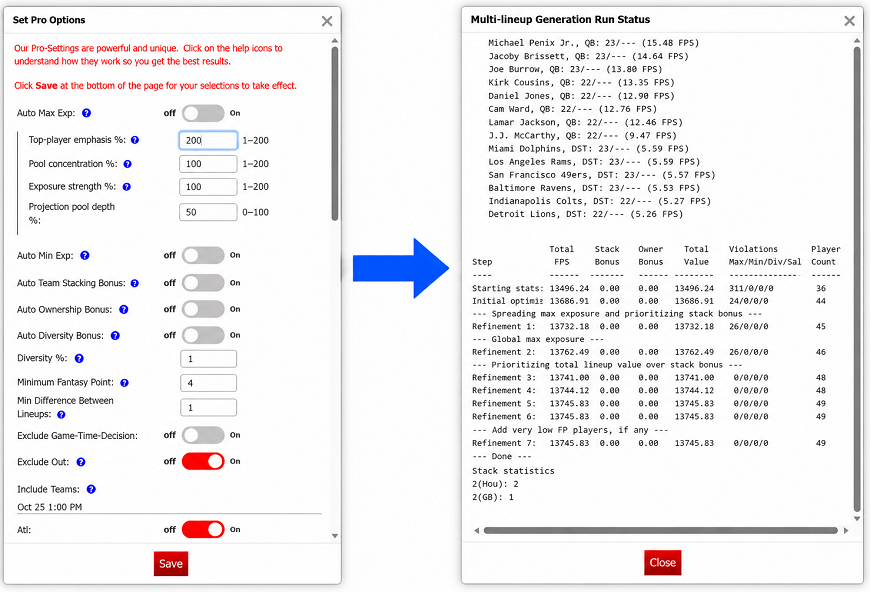
Top-player emphasis therefore acts more like a curve-shaping tool than a simple exposure multiplier.
Raising it allows the strongest projections to stand farther above the rest of the pool.
Max Test 4: Pool Concentration
For the final Max test, I reset Top-player emphasis to 100 and lowered Pool concentration from 100 all the way to 1.
This flattened the broader exposure curve.
Instead of creating large differences among players within the same position pool, many of their maximums became very similar. Among wide receivers, for example, Puka Nacua received a Max of 68 while a very large portion of the pool clustered around 61. Running backs similarly clustered around the low 50s.
The optimizer finished at 13,686.50 projected fantasy points, used 49 players and had no Max violations.
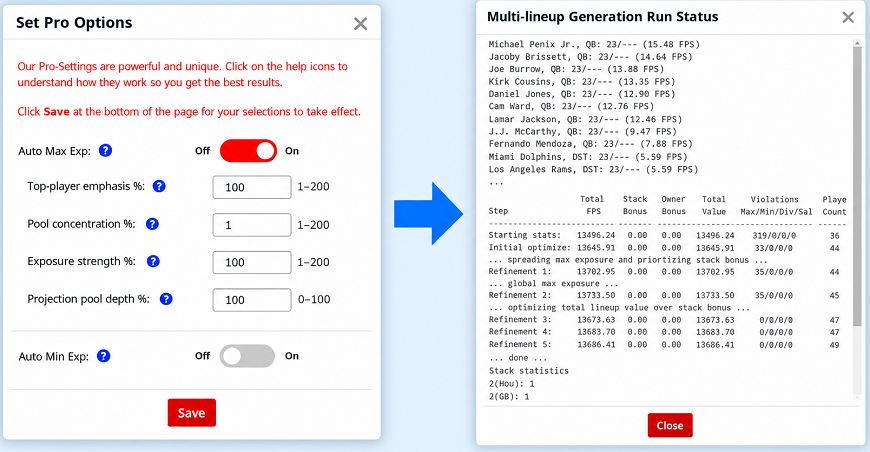
The scoring impact was relatively small, but the exposure distribution clearly changed.
Lower Pool concentration makes the broader exposure curve flatter. That gives players within the pool more similar maximums.
Whether that is desirable depends on what you are trying to accomplish.
Auto Min Exposure
Minimum exposure behaves differently because it does not merely give the optimizer permission. It asks the optimizer to actually use players.
That makes overly aggressive minimums especially costly.
Min Test 1: Exposure Strength
At the original Min Strength of 100, the optimizer used 144 players and finished with 12,892.40 projected fantasy points.
Many lower-projected players received minimums of 2, effectively asking the optimizer to make sure all of them appeared twice.
I lowered Min Exposure Strength from 100 to 50.
The change was very clean.
Gibbs' minimum fell from about 40 appearances to 20. Players previously asking for two appearances generally fell to one. The optimizer still spread exposure broadly, but it no longer had to use every lower player as aggressively.
The result improved to 13,556.11 projected fantasy points while using 138 players, with no Min violations.
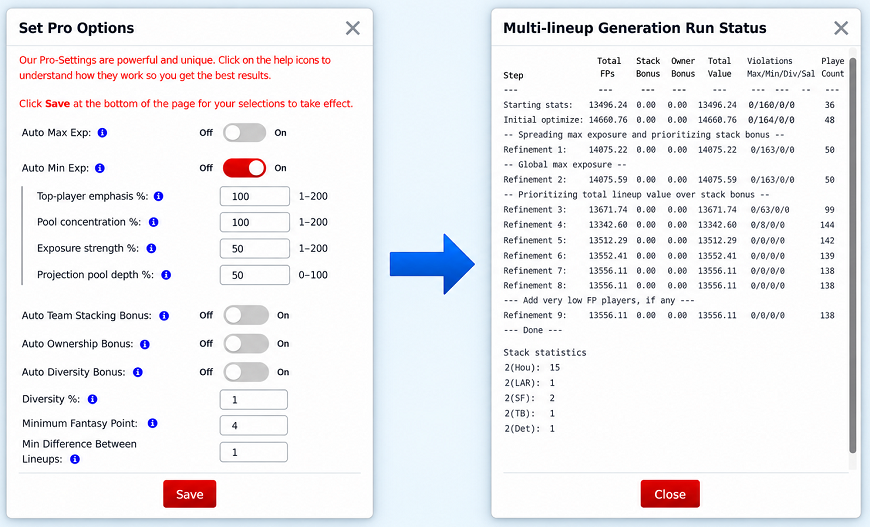
That recovered more than 660 projected fantasy points from the default Min run.
For Auto Min:
Lower Strength reduces how demanding the minimum-exposure targets are.
That can be particularly useful when the optimizer is being forced too deeply into lower-projected alternatives simply to satisfy minimums.
Min Test 2: Projection Pool Depth
I then returned Min Strength to 100 and increased Projection Pool Depth from 50 to 100.
The minimum-exposure distribution became much smoother.
Instead of a large tail of players all receiving the same fallback minimum, players received gradually declining minimums based on where they fell within their position pools.
The result improved from 12,892.40 to 13,213.90 projected fantasy points. The number of players used also fell from 144 to 115, with no Min violations.
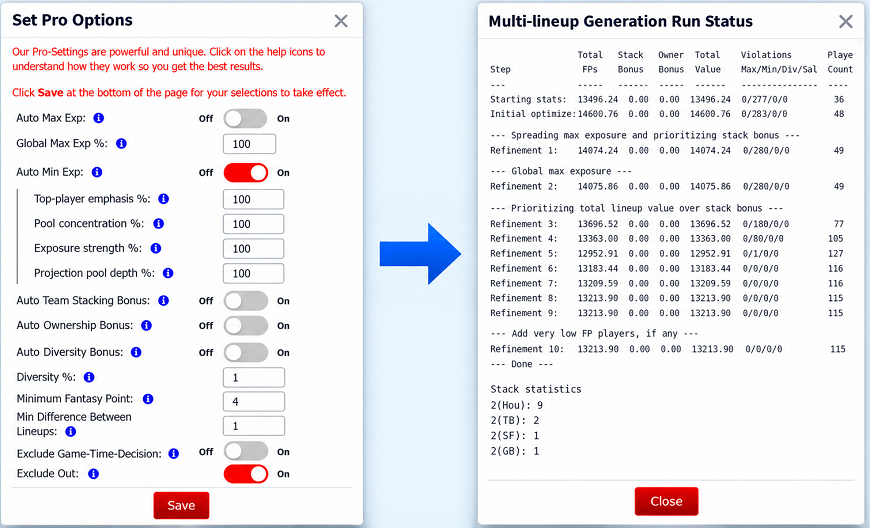
Again, a deeper pool did not mean “use more players.”
In this example, it actually allowed the automatic allocation to distinguish more intelligently among the available players instead of placing so many of them on the same fallback minimum.
Min Test 3: Top-Player Emphasis
Next I kept Depth at 100 and increased Min Top-player emphasis from 100 to 200.
This moved more of the required minimum exposure toward the better projected players.
Gibbs received a minimum of 16, Bijan Robinson and Puka Nacua 14, Christian McCaffrey and Amon-Ra St. Brown 13, and the required exposure declined as projections weakened.
The result improved from 13,213.90 to 13,330.70 projected fantasy points, while the number of players used fell from 115 to 96. Every minimum was still satisfied.
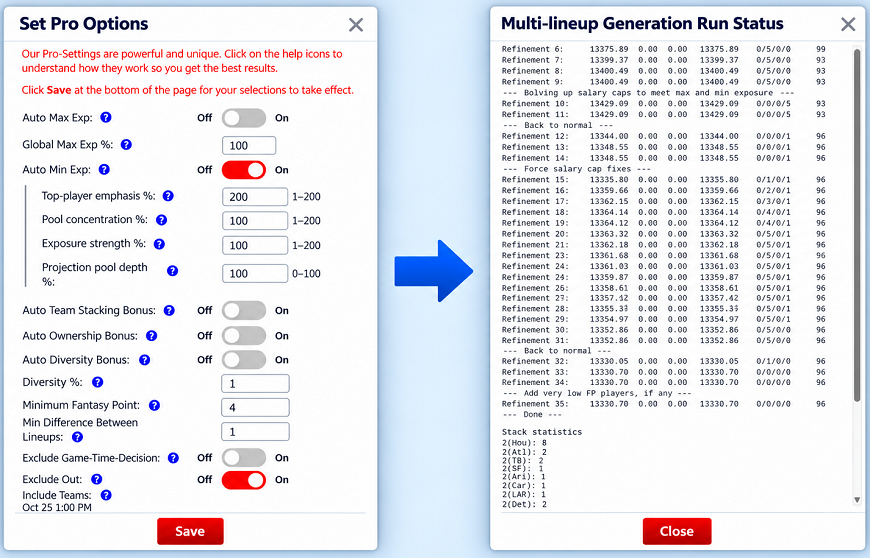
This is a good example of why exposure shape matters.
We did not simply reduce minimum exposure across the board. Instead, we shifted more of the required exposure toward the players with stronger projections.
That allowed the optimizer to maintain meaningful diversity while sacrificing less projected scoring.
Min Test 4: Pool Concentration
Finally, I reset Top-player emphasis and lowered Min Pool concentration to 1.
The resulting minimum distribution became much flatter.
Many running backs received minimums of 5 or 6 even though their projections varied substantially. Large groups of wide receivers similarly clustered around 5.
The optimizer satisfied every Min target, but it used 121 players and projected fantasy points fell to 13,091.46.
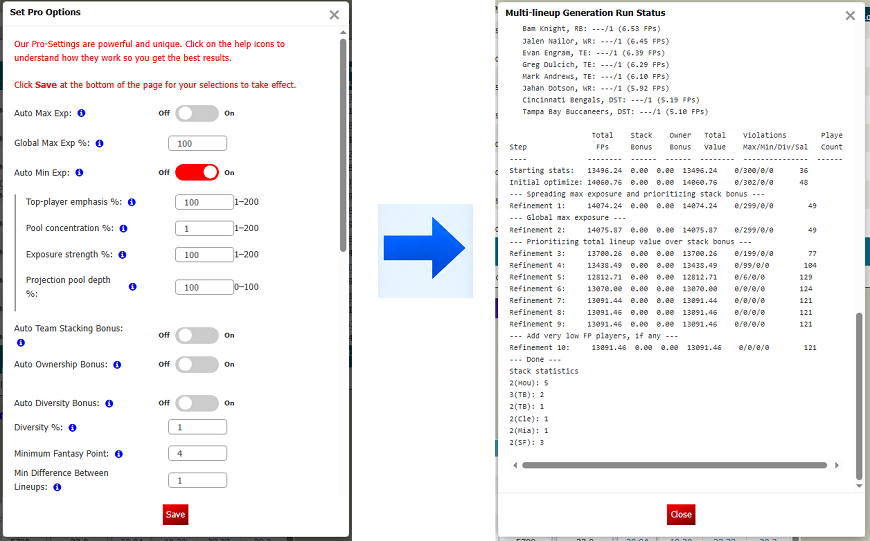
That is an important lesson.
A flatter exposure distribution may look more balanced, but balanced does not automatically mean better.
In this test, flattening the minimum curve required additional exposure to weaker alternatives and reduced projected lineup quality.
Putting Auto Max and Auto Min Together
The individual tests make it easier to understand each control, but most users who enable automatic exposure will ultimately be balancing Max and Min together.
The original defaults produced:
12,702.52 projected fantasy points, 145 players, 79 Max violations and 17 Min violations.
That was too much diversification pressure for this particular slate.
We then changed only Strength:
Max Strength: 200
Min Strength: 50
Depth: still 50 / 50
The result improved to 13,066.47 projected fantasy points, with 139 players, only two Max violations and no Min violations.
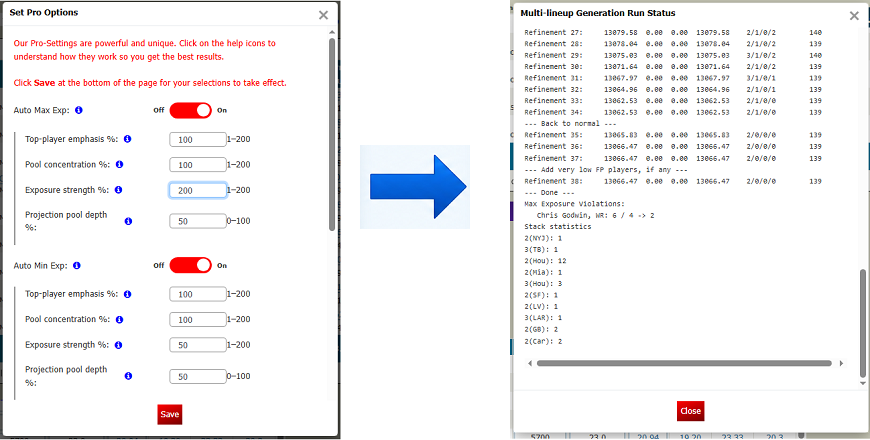
That was a clear improvement, but the lineup set was still being spread very broadly.
So we kept Strength at 200 / 50 and increased both Projection Pool Depth settings to 100.
The result improved dramatically:
13,673.75 projected fantasy points
89 different players
0 Max violations
0 Min violations
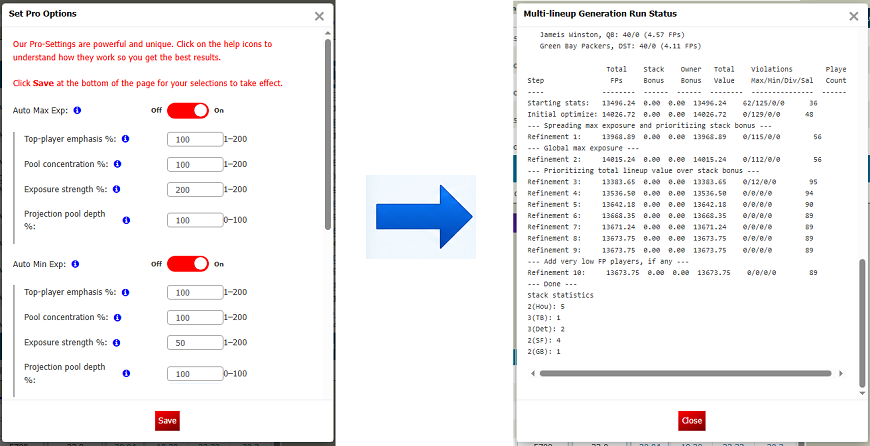
Compared with having exposure controls completely off, projected scoring was lower by only about 2.9%, while the player pool expanded from 49 players to 89.
For this particular NFL slate and this 100-lineup stress test, that was a much better balance.
That does not mean 200 / 50 / 100 / 100 is the correct preset for every slate, sport or contest.
It means the new controls gave us a way to diagnose what was going wrong and adjust the exposure calculation until the tradeoff made more sense.
How to Read the Run Log
The multi-lineup run log is one of the most useful tools for evaluating these settings.
The Total FPs column shows the base projected fantasy points across the lineup set.
Other Pro Options can add bonus value for things such as stacking, ownership and diversity. Those bonus points are not real projected fantasy points. They are optimization incentives that tell the generator which lineup characteristics you value.
For the tests in this article, those bonuses were turned off so we could isolate exposure.
The Violations column shows unresolved Max, Min, Diversity and Salary requirements. If you see a result such as 79/17/0/0, that means there are 79 unresolved Max appearances and 17 unresolved Min appearances, with no Diversity or Salary violations.
The final Player Count shows how many different players were used across the lineup set.
These numbers let you see the tradeoff directly.
More players are not automatically better. Fewer violations are not automatically better. Even satisfying every exposure target is not worthwhile if the settings force the optimizer to throw away too much projected scoring.
The objective is to find a lineup set where the exposure rules meaningfully improve diversification without overpowering the projections.
What Each Setting Really Does
After these tests, I think the easiest way to remember the four controls is:
Exposure Strength determines how aggressive the final Max or Min counts are.
Projection Pool Depth determines how much of the projection pool participates in the primary exposure calculation.
Top-player emphasis changes how strongly the best projected players separate from the rest.
Pool concentration changes how steep or flat the broader exposure distribution becomes.
They work together, but they solve different problems.
If your Max limits are simply too restrictive, increase Max Strength.
If your Min requirements are forcing too many appearances, reduce Min Strength.
If a large group of players is falling onto the same fallback exposure, look at Projection Pool Depth.
If the exposure curve is not distinguishing enough between the strongest and weaker projections, adjust the two shape controls.
And make the changes gradually.
There Is No Universal Best Setting
The examples in this article are exactly that: examples from one NFL Main slate using 100 lineups.
Different sports have different roster structures. Different slates have different projection distributions. Ten lineups behave differently from 100 because exposure percentages become much coarser in a smaller lineup set.
The purpose of the new controls is not to give everyone another preset to copy.
It is to let you see why the automatic exposure calculation is behaving the way it is and give you the tools to adjust it.
Start with reasonable settings. Change one control at a time. Watch the player exposures, projected fantasy points, violations and total player count.
Then let the results tell you whether the change actually improved the lineup set.
The Goal Is Better Exposure, Not More Rules
Auto Max and Auto Min were created to solve a real problem: building a diversified lineup set without forcing you to manually assign exposure percentages to every player.
The new controls make that automation much more flexible.
They also make the tradeoffs much easier to see.
The goal is not to use as many players as possible. It is not to eliminate every repeated player. And it is not to satisfy exposure rules at any cost.
The goal is to build a stronger lineup set—diverse enough to cover meaningful alternatives, but still grounded in the projections that made those players attractive in the first place.
DFS should be treated as entertainment. No optimizer setting or strategy can guarantee a win or positive return. Never risk more than you can afford to lose, and keep it fun.
